Terms and Conditions
Effective Date: July 20, 2020
Hours of Operation
Monday to Friday: 8am – 5pm EST
We are closed outside the times listed above, for the entirety of all Major Holidays, and for any reason that may cause safety or health concerns to our staff. If a Holiday falls on a weekend, we reserve the right to observe the Holiday on a business day of our choosing. We also reserve the right to close our business due to forces outside our control (weather, fire, flood, acts of God, pandemic, and other phenomenon). All support work performed outside our Hours of Operation are billable.
Major Holidays include:
- New Years Day
- Memorial Day
- Independance Day
- Labor Day
- Thanksgiving Day
- Christmas Day
Hourly Rate
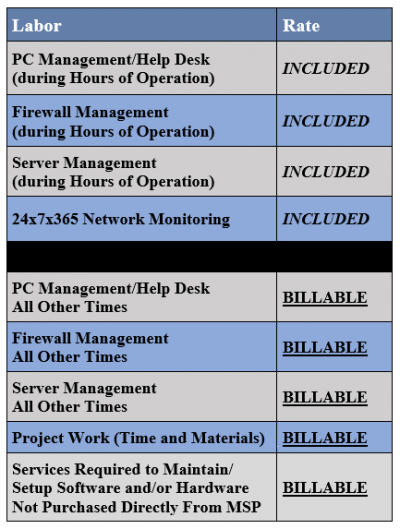
- Support provided during our Hours of Operation (if not covered by Agreement)
- Standard Labor / Travel Rates (if not covered by Agreement)
- Support provided for Out of Scope services (determined by IT Support RI)
- Minimum of 1 Hour billable support
After Hours
- Remote Support provided outside our Hours of Operation
- Excludes support timeframe between the hours of 11pm to 6am
- Excludes Onsite support or any support provided on Major Holidays
- Minimum of 1 Hour billable support
Emergency
- Limited to Business Critical / Business Halted Requests Only
- Support provided during the timeframe of 11pm to 6am
- Onsite support provided or any support during Major Holidays
- Minimum of 4 Hours billable support
Service Level Agreement (SLA) During Busines Hours
Priority & Issue Severity Are Determined by the MSP

General Questions
Help Desk Support
Help Desk Support is defined as:
Maintaining the existing infrastructure and general support requests able to be performed by any member of our Help Desk during our Hours of Operation are included. Software patches or minor version updates are covered. If a support request requires specialized technicians, that request may be considered a project, and become billable. See your Statement of Work for more details.
Server Restoration Times
Server Restoration Times are defined as:
How long it will generally take to restore your failing Server to functioning status. These included services are only applicable during our Hours of Operation. If Client requests us to expedite service and/or work outside our Hours of Operation, the restoration services now become billable. See your Statement of Work for more details.
General timeframes to restore a failing Server are anywhere from 2 – 3 full business days. This can take longer if data restoration issues occur, if replacement hardware is not available, vendor support is not available, or other reasons outside our control.
If Client has a Quick Restore Server from us, restoration times are estimated to be within a few hours of notification from Client. Quick Restore Server will act as the “Main Server” while original server is brought offline for repairs.
Projects
Projects are defined as:
Additions, moves, and changes to the existing infrastructure are billable. If it’s a full version upgrade or major update to a piece of software, then it would be considered a project, and would be billable. If specialized technician(s) are required for the job, your service request must be quoted and billable rate may vary from outlined above. See your Statement of Work for additional details.
New User Information
New User Information is defined as:
Creation of a new user account to be used on your Domain or within your Email system (if supplied from us).
New User Information must be submitted at least 1 full business day prior to requested setup date. If you require any hardware, we need at least 5 full business days after a quote has been signed/approved for new user hardware.
We can try to prepare and accomodate your request as much as possible ahead of time, but we cannot guarantee that hardware will be available by requested setup date.
For any New User or New Email setup, please fill out the form on this page: https://www.itsupportswfl.com/newuser/
Updated Requirements For All Companies Under Office Solutions Maintenance Plans:
SOFTWARE HARDWARE & SECURITY
Customer understands and agrees that data loss or network failures may occur, whether or not foreseeable, if the Customer fails to maintain proper security for its computer and information system including software and hardware updates. Customer therefore warrants that it will follow software and hardware updates and maintain specific security standards, policies, procedures set forth below.
- Business Grade Anti-Virus Software Installed On All Desktops, Laptops And Servers. As Systems Are Added Or Decommissioned, They Will Notify MSP To Any Changes So Steps Can Be Taken To Properly Maintain The IT Network And Security Standards.
- On A Daily Basis, Ensure That All Desktops, Laptops And Servers Are Left On Overnight So Backups, File Syncs, Updates And Patches May Be Performed.
- If Unique Backup Schedules Are Requested (I.E.: Yearly Archives, Multiple Versions, Etc…) Customer Will Be Required To Purchase Additional Hardware As Needed For Backups Requested. Customer Acknowledges That Additional Monthly Charges Based On Backups Requested May Apply.
- A Document Listing What Is Consider “All Critical Data” And Current Locations Is Provided To The MSP. All Data On This Document Is Reviewed, Updated And Submitted To The MSP Monthly Or As Critical Data And/or Current Locations Change.
- All Systems (Laptops, Workstations, And Servers) And Devices (Smartphones, USB Drives) Storing Personally Identifiable Or Protected Health Information Must Be Securely Overwritten Or Wiped Using An Approved Secure File Deletion Utility Or Third Party Company That Maintains Industry Certifications Such As ISO-27001, ISO-14001, ISO-9001 Upon Decommission Of The Device To Ensure That The Information Cannot Be Recovered.
- All Portable Devices (Such As Laptops, Tablets And Smartphones) Containing Personally Identifiable Or Protected Health Information Must Use Industry-Accepted Full-Disk Encryption Technologies*.
- All Removable And Easily Transported Storage Media (Such As USB Drives Or CDS/DVDS) Containing Personally Identifiable Or Protected Health Information Must Use Industry-Accepted Encryption Technologies*.
- All Portable Devices (Such As Laptops, Tablets And Smartphones) Containing Personally Identifiable Or Protected Health Information Must Be Included In Their Maintenance Plan.
* “Industry-Accepted” Means Accepted By The Cryptographic Community.
Customer agrees and understands that if it does not comply with the standards represented above, that the MSP will not held responsible for any data loss, failed compliance audits, and/or network failures.
If you have any questions, please reach out to your account manager directly or submit a ticket to our Help Desk. You can also visit our welcome page for additional details and contact information. Always refer to your Master Service Agreement and/or Statement of Work for additional details.